
This helps you share important pre-travel information with attendees, so everyone has the same details before the meeting. You can use it to confirm venues, share accommodation details, or add notes and links before sending.
How it works
Once your meeting destination is locked in, you can create, preview, and send a summary email to all attendees or selected attendees.
- Meeting name
- Dates
- Destination
You can also customize the message to include additional information, such as:
- Venue details
- Accommodation
- Custom notes
💡 Use AI to draft and format your meeting notes faster by pulling in details like hotel information and location notes automatically.
.gif?width=670&height=417&name=AI%20meeting%20brief%20(1).gif)
📍 You can attach up to five files, such as PDFs with transport information, packing lists, or agendas, to your message.
To track who has received the latest communication, you have two options:
-
Check the Attendee roster: View the last communication date for each attendee.
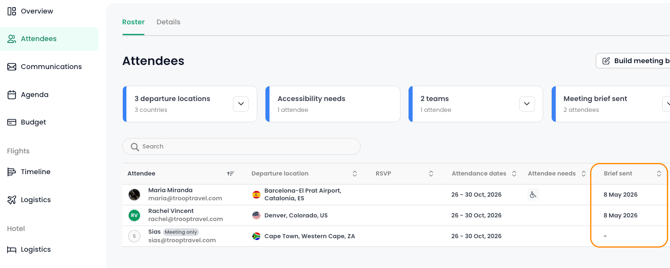
- Check the Communications tab: Review the full messaging history and resend messages.
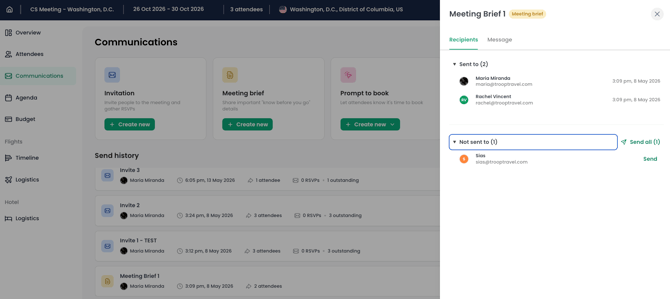
💡 If an attendee responds to the meeting brief email, their reply will be sent to the meeting organizer’s inbox.
Key benefits
- Save time: Reduce manual email work and consolidate pre-meeting communication into one step.
- Improve accuracy: Share accurate, up-to-date meeting information directly from TROOP.
- Reduce confusion: Provide a single source of truth for essential details, from travel dates to packing lists.
- Enhance professionalism: Send consistent, well-formatted communications to attendees.